Compare Supplier Quotes
Keep competing merchant quotes together, then compare totals and line items without overlooking missing specifications, quantities, VAT, or delivery.
A better way to compare supplier quotes
A supplier quote is more than a grand total. Two merchants can quote for the same project while using different product descriptions, pack sizes, quantities, delivery assumptions, or specifications. Comparing only the final figures can make an incomplete quote look like the cheapest one. Quote compare keeps the underlying detail visible so you can make a fair buying decision.
Create a project for the job, add each merchant quote, and keep all of the files belonging to one quote together. The project becomes a private workspace for the decision: original documents, extracted rows, your corrections, the comparison, and the evidence behind any explanation stay connected rather than scattered across email threads and downloads.
The feature is for comparing quotes you already have. It does not send quote requests to merchants, place orders, or promise that two differently described products are identical. When information is missing or uncertain, the comparison says so.
Upload and group the paperwork
Start by naming the project so it is easy to revisit, such as a bathroom refurbishment or a replacement-heating job. Add a merchant quote and upload the files that belong to it. A quote can have more than one page or attachment, so a photo of the front page, a continuation page, and a terms sheet can be grouped as one merchant quote instead of being mistaken for three competing offers.
The upload contract accepts either a multipart file or JSON containing a file name, MIME type, and base64 file, and enforces a maximum of 20 MiB per file, 20 attachments per quote, and 40 pages per file. The extraction worker validates and processes PDF, JPEG/JPG, PNG, WebP, GIF, BMP, TIFF/TIF, HEIC/HEIF, XLSX, legacy XLS, DOCX, DOC, CSV, and UTF-8 TXT. Text PDFs and Word files become extracted text; scanned PDFs and image formats are rendered or converted for vision extraction; XLS/XLSX and CSV rows can become line items when their columns are recognizable; TXT is retained as text. Vision extraction needs the server AI integration, and extracted or unstructured fields still require review rather than being silently guessed. Encrypted, corrupt, invalid, or over-limit files return an actionable processing error.
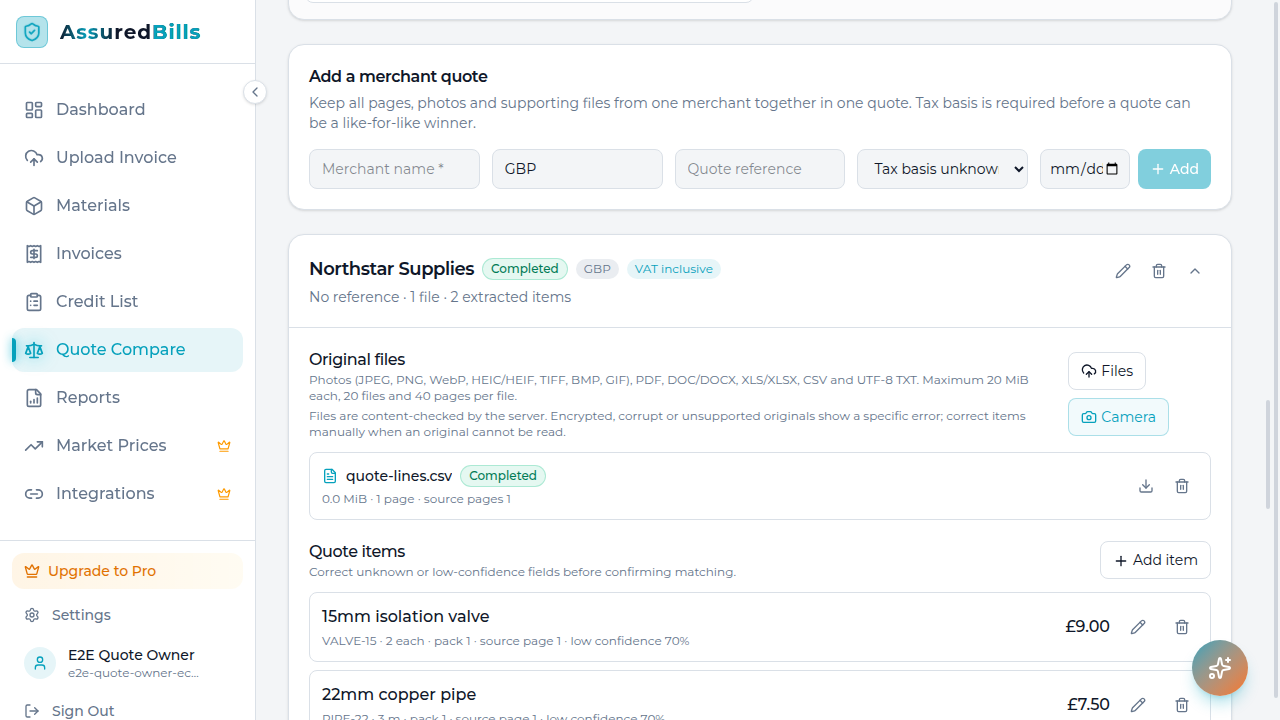
After processing, the original files remain available with the quote. You can view or download the source when a line needs checking, replace a poor photo, add a missing page, retry a failed file, or remove an attachment without losing the rest of the merchant quote.
Review extraction before relying on it
Quote compare stores the information needed for a useful review: merchant, quote reference and date, currency, quote-level delivery, VAT, discount, quoted total and tax basis, plus item description, product code, brand, model, specification, quantity, unit, pack size, unit price, line price, VAT rate, source page and confidence. Tax basis is explicitly unknown, VAT-inclusive, or VAT-exclusive. Values that cannot be established remain unknown. That is important because a blank delivery charge and a free delivery charge are not the same thing.
You can edit merchant names and extracted quote information, correct a description or quantity, and adjust an item before comparing. Low-confidence or unreconciled rows remain visible for review rather than being quietly folded into a confident-looking result. Corrections are saved with the project and become the inputs for the next comparison.
This review step is not unnecessary administration. It is where you confirm that a trade abbreviation, a blurry digit, or a split line has been interpreted correctly. Keep the original file open beside the extracted row for high-value items, and treat anything marked unknown as a prompt to check the merchant's wording.
See like-for-like differences side by side
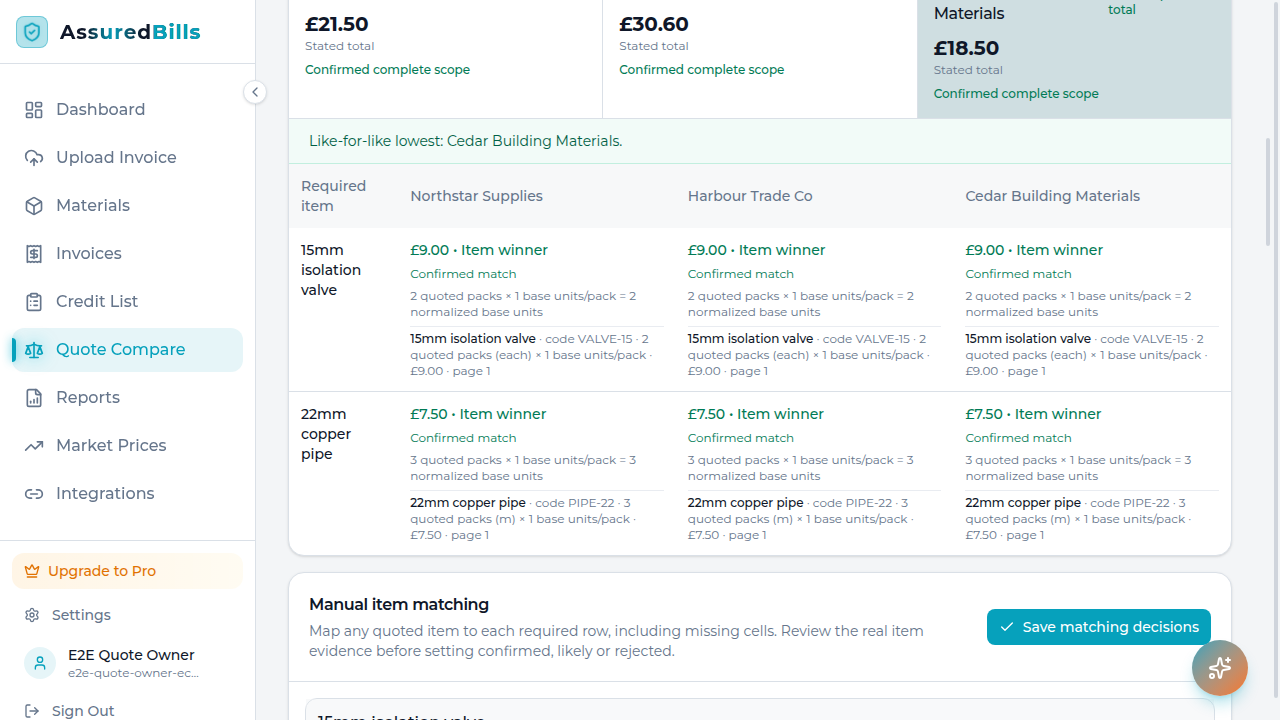
The comparison matrix aligns products across merchants while preserving the source wording. Exact matches can be shown together, while likely equivalents are identified as needing confirmation. A 22mm copper tube, a boiler with a different output, or a box of 100 fixings should not silently compete with a smaller pack or a different specification.
Rows call out material differences that change the decision: missing items, brand or model changes, specification differences, quantity changes, and pack-size differences. An initial union of the items found in the quotes helps you see scope, but it is not presented as a verified required list. You can set the project's required items and confirm or correct matches when the job has a precise scope.
That distinction prevents a common mistake: declaring a winner because one merchant omitted an expensive item. The lowest visible total and the cheapest complete like-for-like quote are separate outcomes. If a quote is incomplete, uncertain, or cannot be reconciled, the project keeps that limitation in view.
Understand totals, VAT, delivery, and units
Quote compare calculates comparisons deterministically from the reviewed rows. It keeps quantities, units, pack sizes, discounts, delivery, tax basis, VAT treatment, and quote totals connected so that a unit price is not mistaken for a pack price. An inclusive quote treats its line, delivery, and discount figures as already VAT-inclusive, so the recorded VAT amount is informational and is not added again. An exclusive quote adds the recorded VAT amount; an unknown tax basis leaves the quote ineligible for a complete like-for-like result. Ties and price differences are shown at item level where the data supports them, and charges that are unknown are flagged rather than assumed away.
Currencies remain separate. The feature does not quietly convert pounds, euros, or another currency using an unverified rate, and it never treats an absent item as zero cost. If the totals cannot be compared on a consistent basis, the result explains why instead of producing a false ranking.
This makes the result useful in real conversations with merchants. You can see which supplier is lowest on a particular confirmed item, whether delivery or a discount changes the quote-wide total, and where a cheaper-looking line is actually a smaller pack. The numbers are a decision aid, not permission to ignore the qualification printed on the quote.
Use the grounded and optional AI summaries carefully
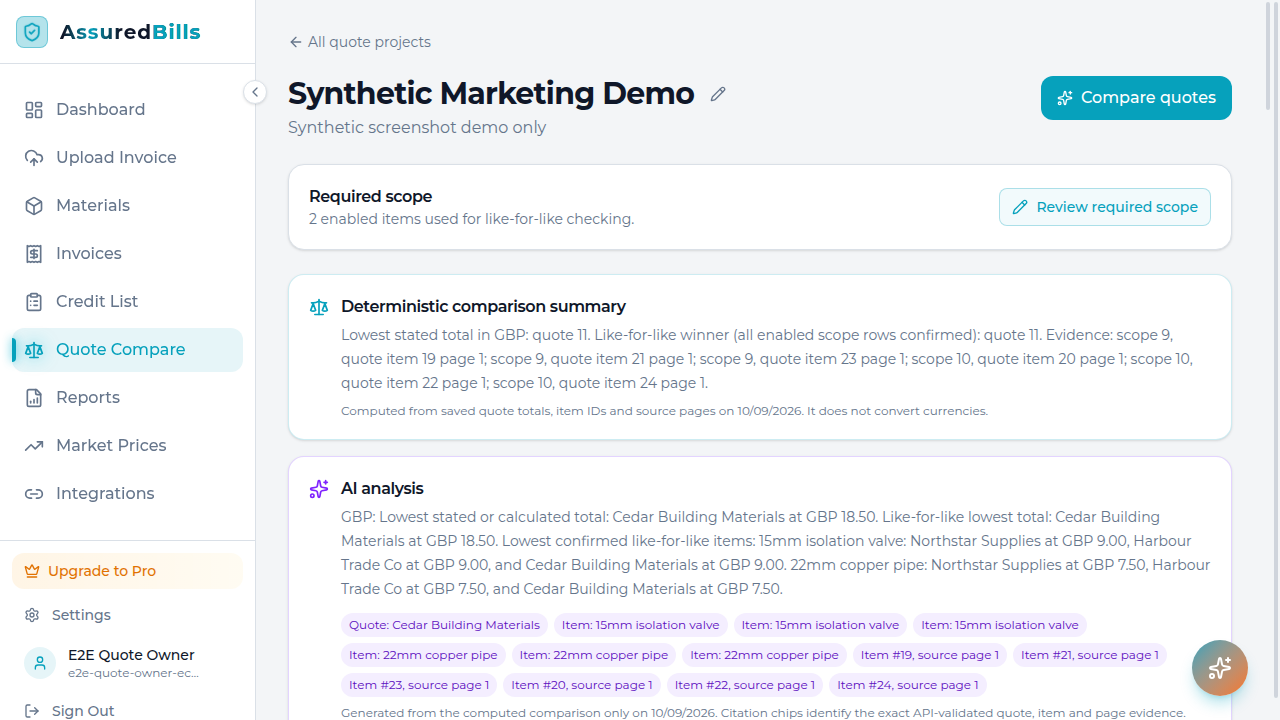
The comparison response contains a deterministic grounding summary and a separately labelled optional AI summary. The deterministic text is authoritative for the computed totals, quote IDs, item IDs, currencies, warnings, and source-page references; it is not AI output. When the optional AI integration is available, the model receives the complete computed JSON, chooses which validated quote, item, and page evidence to cite, and generates a concise narrative. Its output shape is schema-validated and its citations and declared winner IDs are checked against that evidence; it does not calculate totals, convert currency, or change the computed result.
The optional AI summary can be unavailable, and it must not be treated as a substitute for the deterministic result. Neither summary should name a definitive like-for-like winner when quotes are incomplete, currencies differ, extraction is uncertain, or requirements have not been confirmed. The model receives computed JSON rather than untrusted source-document instructions, but you still decide whether a product or substitution meets the job.
Read both summaries alongside the matrix and original files. Confirm important matches, correct extracted values, and ask the merchant about missing terms before placing an order. The API does not promise a split-merchant subtotal or a final delivered cost: delivery, minimum orders, availability, discounts, VAT, and quote-wide terms remain matters to verify.
Keep decisions in saved projects
Projects are private to the signed-in owner and persist so you can return to a live procurement decision later. Rename a project as the work develops, add another merchant, edit a quote, replace an attachment, or delete a quote that is no longer relevant. Deleting a quote updates the comparison; deleting a project asks you to confirm that its contained quote data and files should be removed.
Every material edit invalidates the previous result so an older background job cannot overwrite newer corrections. Rerunning comparison uses the current project inputs. This gives you a clear record of what was compared, which rows were corrected, and why the result may change after a merchant sends a revised quote.
A practical quote-review routine
For a new job, collect every merchant response in one project as it arrives. Group pages before processing, review the high-value items first, and set a required list for the parts that must be present. Then scan the matrix for omissions and specification changes before looking at the headline total. The cheapest complete option is often not the first total you notice.
When a price difference matters, open the original page and check the unit, pack, VAT basis, delivery wording, and any expiry date. If the AI summary highlights an uncertainty, resolve that uncertainty rather than treating it as a recommendation. After a revised quote arrives, add it as the current merchant evidence or update the existing quote, then rerun the comparison so the decision reflects the latest terms.
Frequently asked questions
Can I compare more than three merchants? Yes. A project supports multiple competing merchant quotes and does not assume a fixed three-quote layout. Add the quotes you actually received and use the matrix to compare the shared scope.
Can several photos belong to one quote? Yes. Group related files under one merchant quote. This keeps a continuation page or terms sheet from being counted as another merchant.
Does the lowest total always win? No. A low total can be incomplete, use a different quantity or pack, exclude delivery, or use another specification. Quote compare separates the lowest quoted total from a justified like-for-like result.
Does it convert currencies? No. Currencies are kept separate initially. A mixed-currency project should not receive a single ranking based on an invisible or stale exchange rate.
Can I trust an optional AI summary to approve a substitution? No. It can explain computed evidence and highlight likely equivalents, but you must confirm that a specification, brand, model, or substitute meets the project's requirements.
What if extraction is wrong? Review the flagged row against the original, edit the merchant or item information, and rerun the comparison. Unknown values stay unknown until you supply a reliable correction.
Can I use the feature without an account? The information page is public, but quote projects and source files are private account data. Sign up to create and save a project; signing in is required for the comparison workspace.
Ready to compare a real project?
Bring your next set of merchant quotes together, review the evidence, and make the like-for-like decision with fewer surprises.
Create a free account Explore Assured Bills